
What I learnt by automating my expense tracking with AI
I built an automated shopping receipt tracker using Google services, Make.com, and Telegram.
To date, plenty of commercial and non-commercial solutions already exist. However, when it comes to AI, experimentation is my preferred way to learn, stay up to date with new developments, and generate new ideas. Only through first-hand experience can one understand the full capabilities of frontier models, their limitations, and the wider impact AI may have.
In this post, I write about my learnings, where I got stuck, and why I belive the way we build software is about to change fundamentally.
The problem: from crumpled paper to financial insight
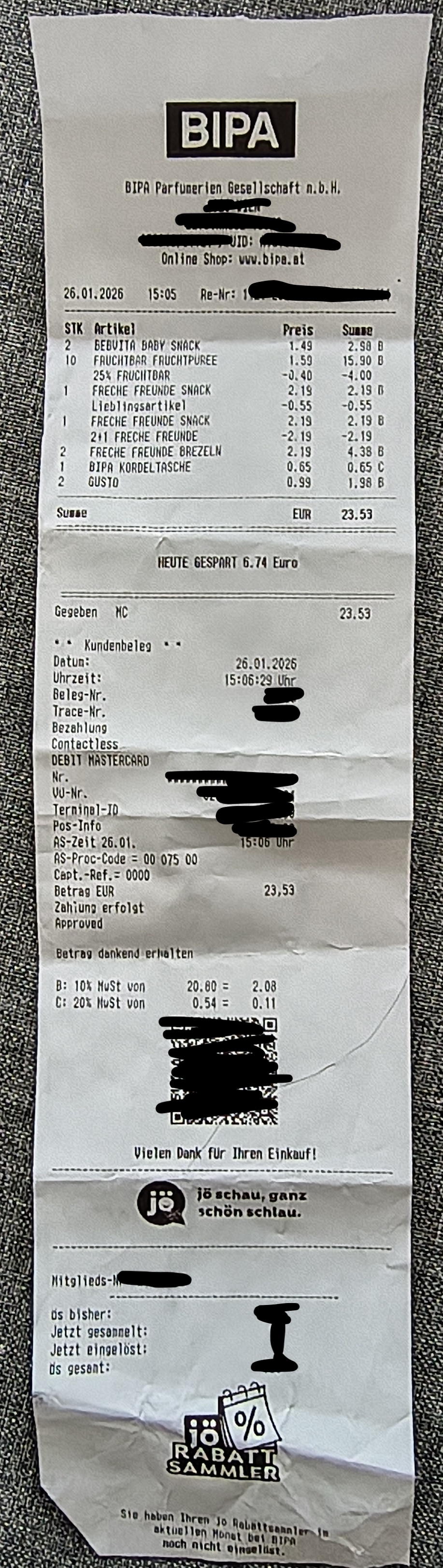
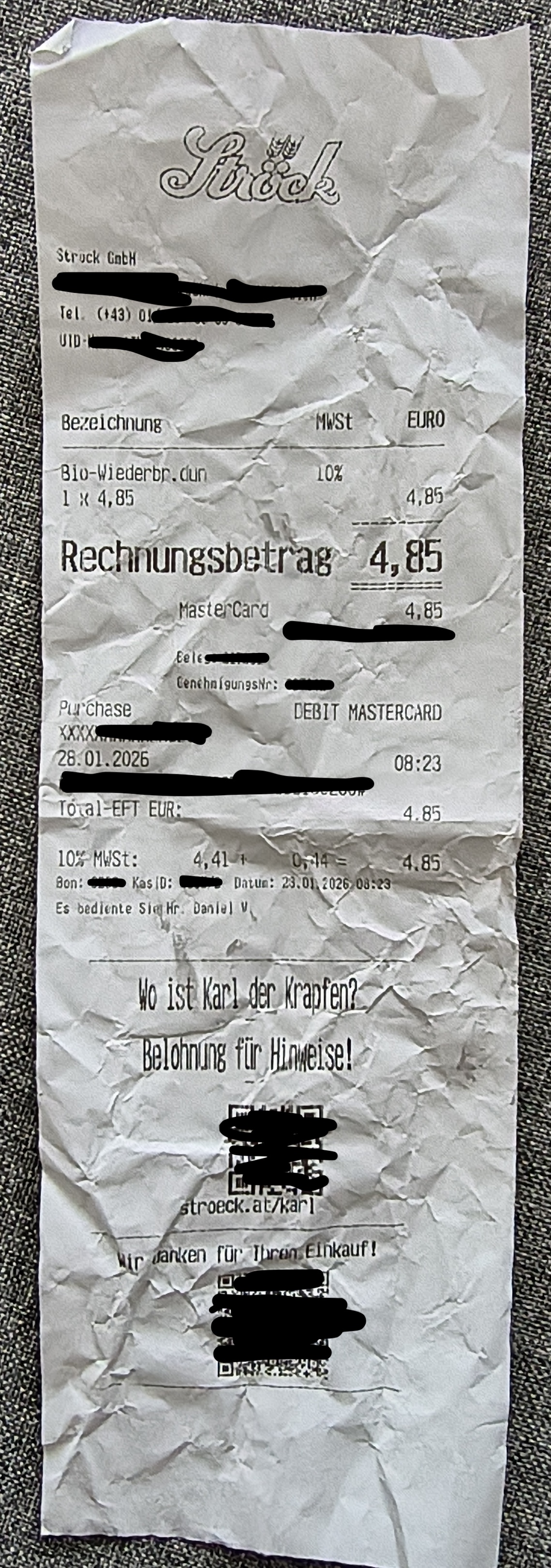
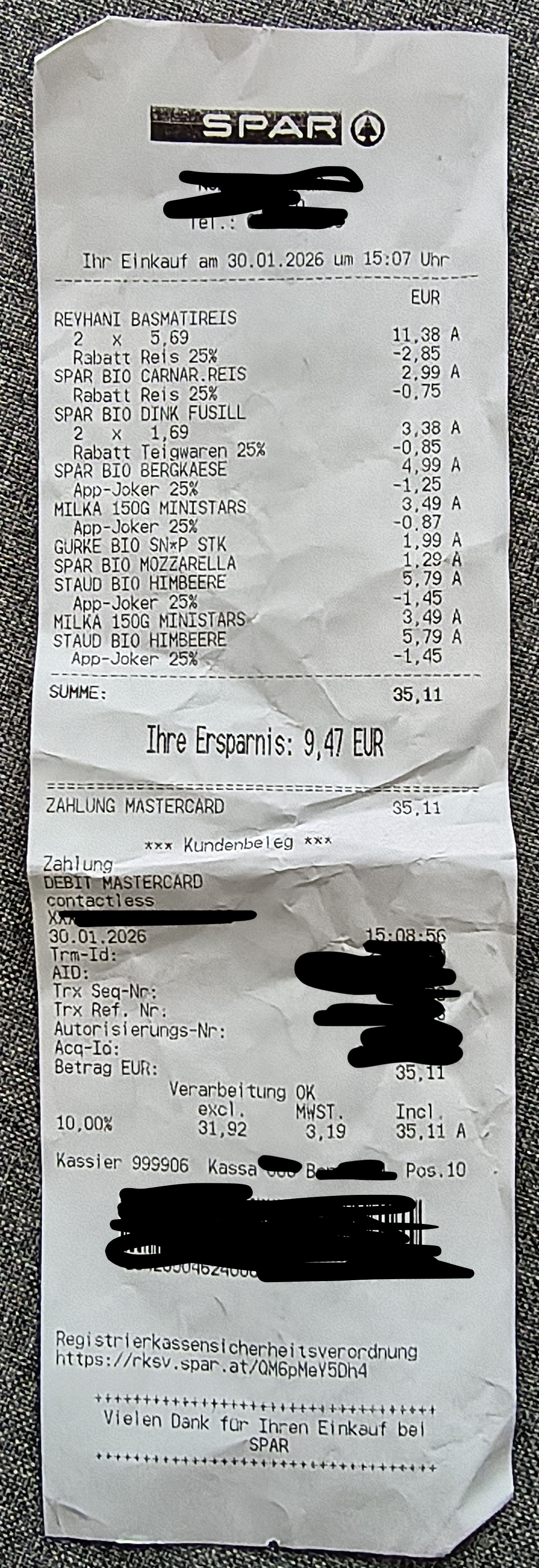
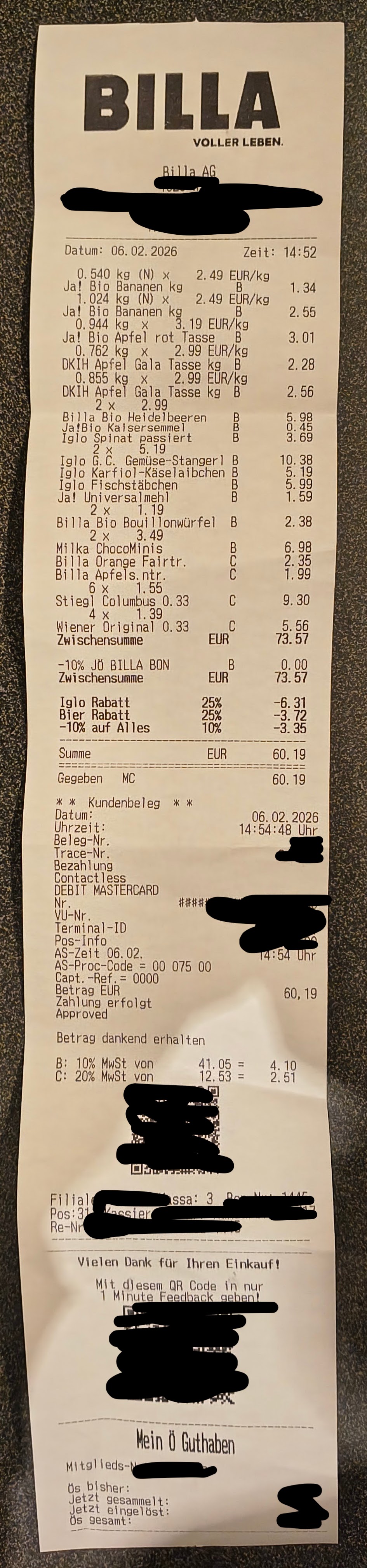
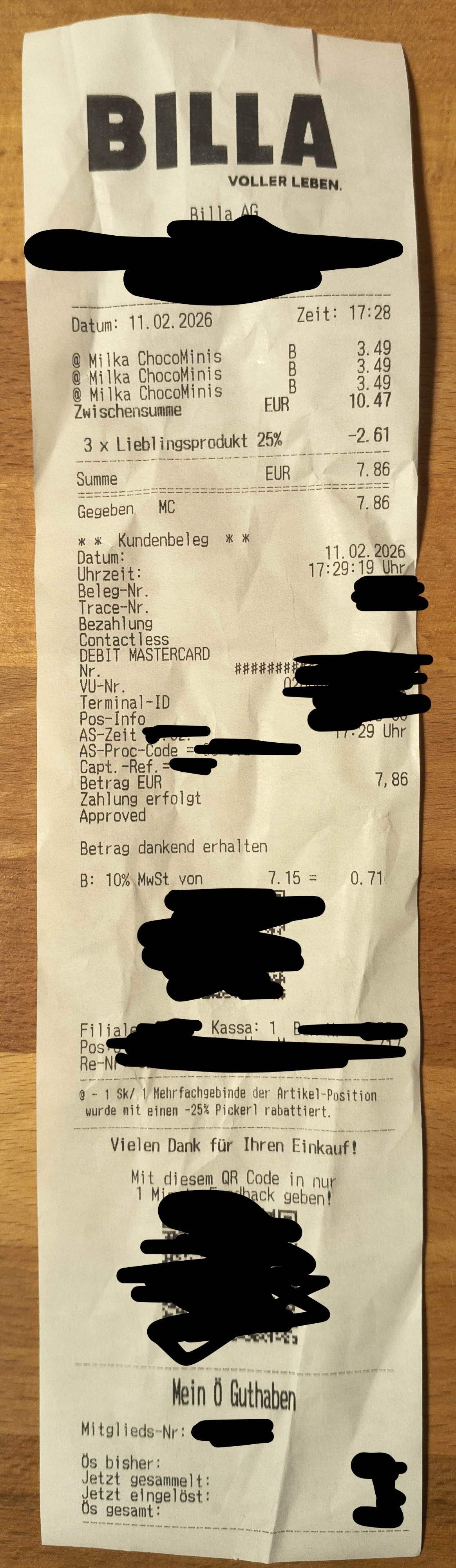
I usually track my expenses on a monthly basis to get a better overview of my finances. At the end of each year, I run a deeper analysis to improve my spending behaviour. As part of this, I collect roughly one month of shopping receipts to understand individual purchases: items, quantities, and prices. Here are a few example receipts:
 |
 |
 |
 |
 |
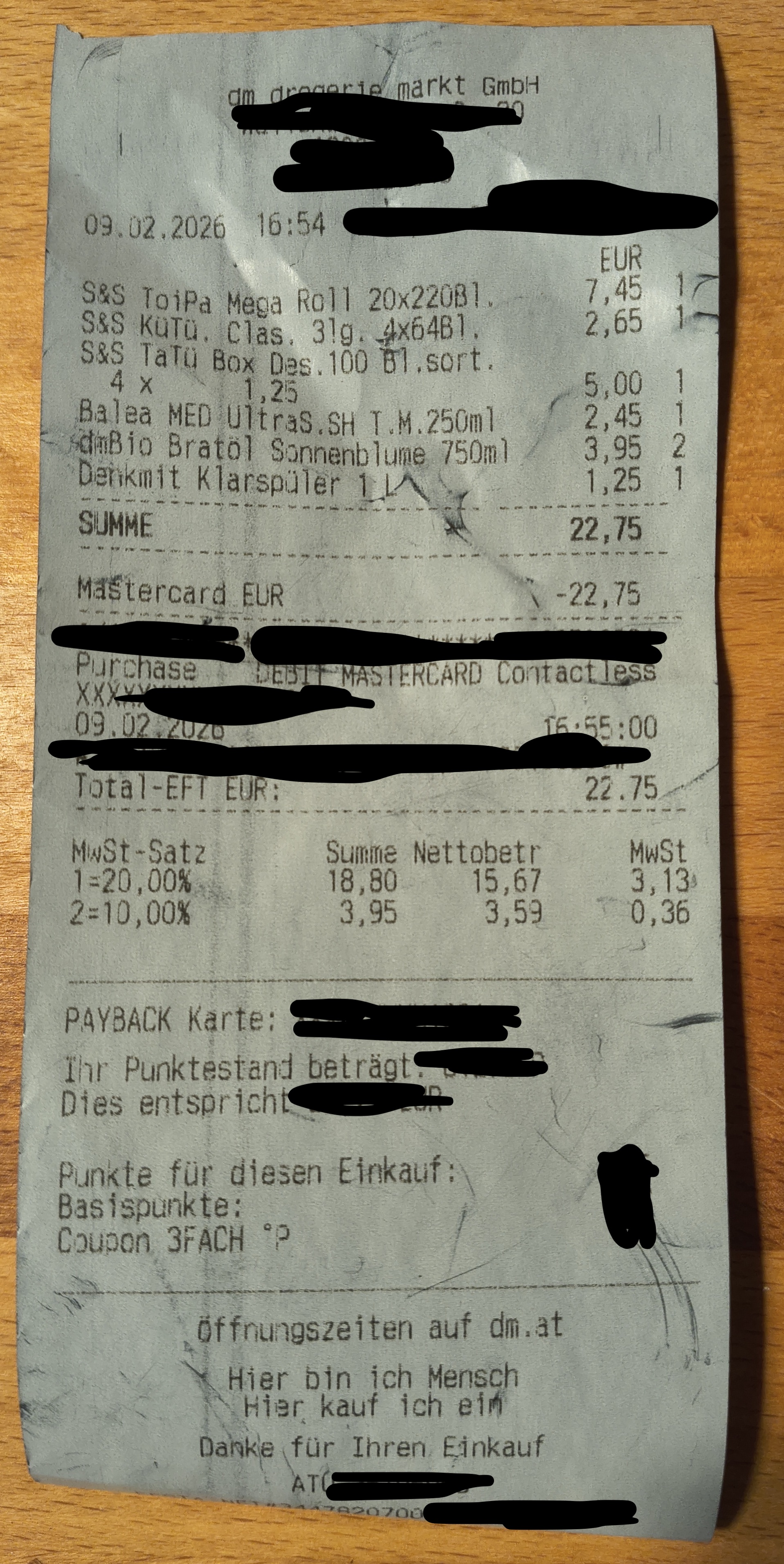 |
These are particularly interesting (and challenging) as the task requires a deeper understanding of the content: different layouts, applied discounts, and so on. The end result of this (manual and time-consuming) exercise is a spreadsheet created from the collected (100 or so) receipts:
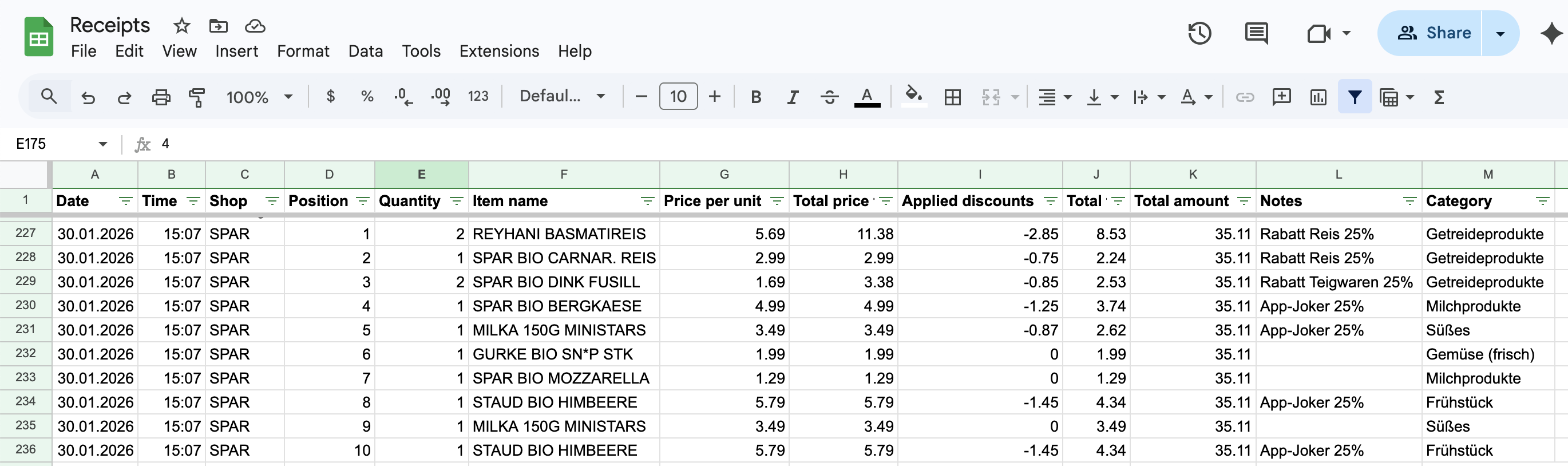 Google sheet populated with rows from the third receipt shown above.
The ultimate test for value creation is simple: how much money is saved? While I have only been collecting data for a few weeks, I created a simple agent in Make.com that pulls the spreadsheet data, uses web search for price comparisons, and provides suggestions on how to reduce spending. So far, the agent’s analyses and recommendations were spot on. Whether I will actually save money depends on continued use and changed behaviour, but the path from raw data to actionable insight is clear.
The vision: a zero-friction workflow
The minimum viable product solution I envisioned: take a picture of a receipt with your mobile phone, send it through a messenger of your choice, have it OCRed, a spreadsheet automatically populated, and finally receive a message with your updated monthly spending statistics.
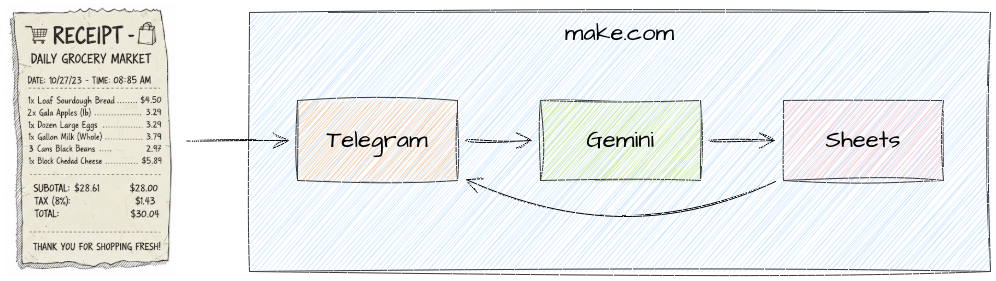 Image partly generated with Gemini.
Especially for AI use cases, I focus on the most challenging part first. In my case, this is the Optical Character Recognition (OCR) part. A few years ago, it would have required significant efforts to deal with all sorts of different receipts, tilted or rotated images, varying lighting conditions, and so on.
In 2026, that’s a perfect fit for multimodal AI and workflow automation! Also, for my personal use case, small mistakes are perfectly tolerable.
The journey: five lessons from the quicksand
The prototype high
Anyone can build a quick prototype with the help of LLMs. I used Google Gemini to guide me through the creation of a first prototype. It helped me to select appropriate tools, suggested different options based on my preferences, and highlighted their tradeoffs. My first version was based on Make.com for no-code workflow automation, Gemini for OCR, Google Sheets API for spreadsheets, Google Visualization API Query Language for complex SQL-like queries, Twilio.com as a communication service, and WhatsApp as a messenger.
Why? I started out with these services because:
- Make.com offers many connectors and modules (more on that later)
- Familiarity with the Google ecosystem
- I didn’t want to host or run infrastructure
- These services offer free tiers or trial credits
- Privacy and security seemed sufficient for my use case
While Gemini guided me through the creation step by step, some actions were based on outdated documentation or user interfaces, leading to frustration or required workarounds. After running into various API errors, such as bad requests, rate limitations, and the like, it quickly became clear that this would just be a first starting point and not a productive solution with proper testing, error handling, and so on. On the positive side, the first prototype took me just a few hours to create and I didn’t spend any money on it.
The OCR inflection point: multimodal AI has “solved” image understanding
What presented a PhD-level computer vision challenge, thanks to multimodal AI, now has largely transitioned to a solved problem. At least for a class of computer vision tasks, the bottleneck is no longer the image understanding, it’s the wiring of the tools we use to connect it.
I was stunned by the OCR capabilities of Gemini. It was able to deal with all sorts of receipts, independent of picture orientation, wrinkles in the receipts, and varying lighting conditions. Here is the first part of my prompt:
This is a picture of a shopping receipt (in German).
Extract the bought items from the picture and create a table with the following columns:
- Date in format yyyy-MM-dd (with leading zero)
- Time in format HH:mm (with leading zero)
- Shop name
- Position on receipt
- Quantity
- Item name
- Price per unit
- Total price for items
- Applied discounts
- Total amount of bill
- Notes (e.g. discounts)
- Category
It is followed by a list of categories with examples, and a specification of the desired JSON output structure, including a few example outputs. However, I found that additional explanations must be provided to correctly interpret the receipts of various shops. All in all, it was pretty surprising to me that all the numbers add up correctly, given my instructions. Two obvious warnings should be given though:
Beware of the inherent non-determinism. In order to correctly classify the items as Groceries, Bakery, Health, and so on, I had to provide quite a lot of examples in the prompt (few-shot prompting).
Beware of hallucinations. I once accidentally sent thumbnail-size, low-resolution pictures to Gemini with the result being, unsurprisingly, fabricated outputs in my spreadsheet. In my case, simple out-of-distribution detection could have caught the incorrect outputs, like items or brands I never buy or receipts dating back years. However, the general case is more tricky and may even require human oversight, for example, by instantly reading back the OCR output via messenger.
Another thing worth mentioning is that I spent the least amount of time on the OCR part, which brings me to my next major learning.
The authentication and permission jungle
Make.com offers many ready, built-in modules to chose from, including several ones that are able to connect with Google services easily. However, SaaS products often prioritise convenience over security. When connecting my Google account, I was asked to effectively grant wide-range permissions to my Google Drive, lacking fine-granular access control. Not the user experience I expected.
Despite asking Gemini for help to navigate the complexity of the Google developer jungle, it took me many hours to figure out a working solution that grants only access to a single file in my Google Drive. The main implication is that I now have to use plain HTTP requests to the Google’s APIs instead of the built-in modules. Another downside is that the solution uses OAuth, requiring re-authentication between the two services on a weekly basis.
The messenger dilemma
For privacy reasons, Signal would have been the messenger of my choice. However, it requires self-hosting a Dockerised REST interface around signal-cli, which leads to added complexity, efforts to maintain the setup with adequate security, costs, and so on.
So I moved on to WhatsApp. It was straightforward to set up a sandbox using Twilio and to connect it. However, in order to move to a productive solution, Meta and WhatsApp require business accounts including verification. A significant hurdle that is unsuitable for my personal use.
Finally, I ended up installing Telegram on my Android phone. Within five minutes I had a working solution by setting up my own bot and by connecting it to Make.com. Pictures of receipts can easily be sent to the bot directly from the Google Photos app without any permissions granted to Telegram.
The illusion of no-code: why UI-builders don’t scale
No-code wins the quick prototype, but code owns the productive solution. What looked like an attractive shortcut from the distance, turned out to be more like quicksand. The moment you leave the happy path the main promise of no-code (simplicity) vanishes.
While basic familiarity with REST endpoints, JSON schemas, and the like are sufficient to build a quick prototype, it takes much more to build a performant, robust, and secure productive solution.
As the complexity of my workflow increased, I felt that code would be much more manageable and, more importantly, it would allow for proper testing, error handling, and a clean development workflow. It would have also ended up with a more platform-agnostic solution.
Testing: The no-code approach requires a lot of trial-and-error, so that I had to re-run the entire workflow with single datapoints multiple times. Since the whole workflow is triggered by a Telegram message, I could not partially run or test the workflow easily. Ideally, you want to have automated end-to-end tests, black box-tests for important modules, such as the OCR part using a wide range of test images, and you typically want to mock dependencies, such as the messenger service.
Error handling: While the no-code approach allows for basic error handling using built-in flows, the workflow gets complex quite quickly. By not following a test-driven approach, you need to build the workflow iteratively. Every time you encounter a new error, you extend the workflow by new paths, effectively increasing its complexity further. Without proper testing it’s unmanageable.
Dev workflow: While it might be ok to have just one solution if you’re the only person working on it, the moment another person contributes or uses the resulting data, having a clean development workflow is key. I quickly discovered that the no-code approach didn’t easily allow me to iteratively and incrementally improve or change the solution without side-effects. Having clearly separated environments, proper staging for the workflows and for the data is a necessity. Another thing that comes with only marginal overhead if your solution code.
Platform-agnostic solution: I am very reluctant to add another proprietary platform like Make.com to my toolbox due to the inherent vendor lock-in. I discovered quite a few proprietary platform elements, such as the handling of arrays, string manipulation functions, and the like. What is more, I had to apply a workaround to implement a basic while loop, something that’s easily done using code.
The solution: my automated tracker
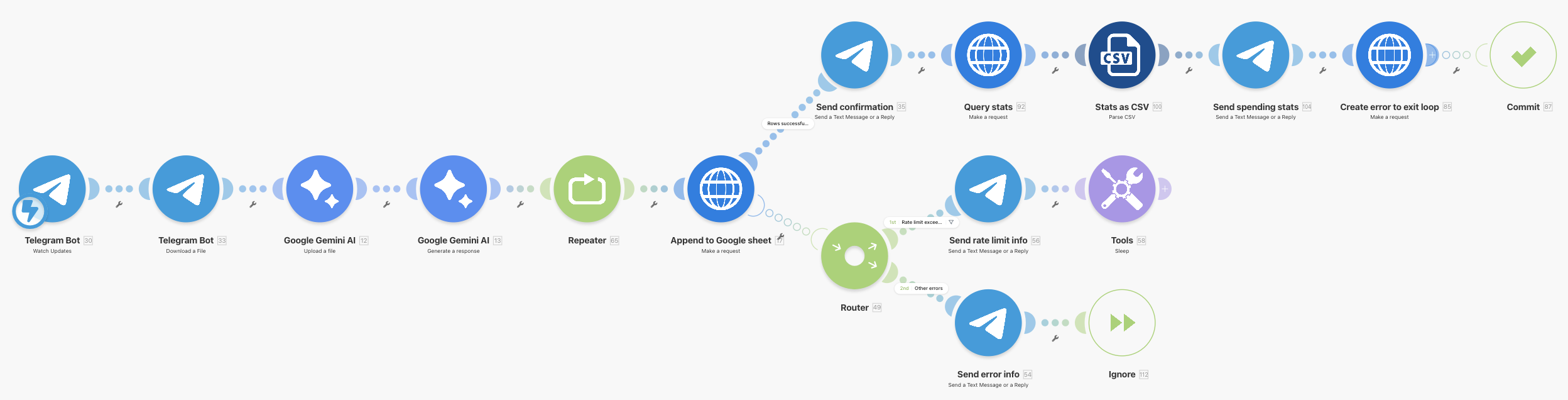
The workflow consists of these basic steps:
- A Telegram trigger that activates whenever I send a picture to the bot channel, followed by a module that downloads the attached image.
- Next, Gemini modules first upload the image, then perform the OCR part, classify the bought items, and generate a JSON response.
- A repeater module to handle exceeding rate limits of the Google APIs.
- An HTTP request that appends new rows to a Google sheet.
- In case of success (top path), a confirmation is sent via Telegram, spending statistics are queried from the sheet and also sent.
- The other paths are triggered in case of errors (e.g. rate limitations, required re-authentication).
Let me add a few notes:
Rate limitations: I found that they almost only occur when I batch-send dozens of receipts through the workflow. This was particularly tedious when using free tiers of services. Upgrading to a paid Gemini tier solved the issue. To prevent hitting rate limitations of the Google Sheets API, for example when appending a large number of rows to a sheet, I simply configured the Telegram trigger to only fire a few times per minute.
Error handling: I decided not to implement any error handling (e.g. in case of bad requests) for the Gemini APIs, as I found they happen very rarely and it’s easier to just send an image again. For simplicity, I also went without any duplicate detection.
File access scope: Since I restricted the access scope of Make.com to only be able to access files on my Google Drive created by the Make.com, I had to create another workflow that initially creates an empty sheet via a simple HTTP request. The sheet can then be formatted, shared, etc. as usual in the Google Sheets app.
Costs: A typical run of the workflow consumes around 10-15 Make.com credits plus a few cents of Gemini tokens. My Make.com Core subscription includes 10 k credits/month for $ 9/month. Over the past weeks I have processed hundreds of receipts multiple times and I have spent less than $ 5 in Gemini tokens.
Closing reflections: towards agentic engineering
I believe we have entered the transition to a new type of software engineering. When no-code is too rigid or too fragile and custom code too much effort, the best option could indeed be agentic engineering. We are moving towards a world where we describe architecture, logic, and so on in natural language—essentially writing a product requirements document (PRD)—and let agents handle the details of authentication, error handling, and testing. With enough oversight, I expect a robust and platform-agnostic codebase that is tested and much more maintainable than a no-code solution. For my next experiment, I will probably be using a tool such as Claude Code or Codex.
Any thoughts or feedback? Feel free to get in touch!